
Pro software
Our pro software replaces the professional programs your sector uses for technical work: 3D design, technical drawing, calculation and cutting plans.
What pro software does
Pro software stands in for the expensive programs businesses must use for technical work. It installs from the same library as our industry software and shares the same foundation.
We make one pro program per sector. There are seven: Furniture, Windows, Glass, Metal Workshop, Progress Payment, Sign and Embroidery Pro. Each opens as a separate area inside its sector program. Below we describe Furniture Pro.
What is our pro software?
Our pro software stands in for the expensive professional programs a sector uses for technical work: 3D design, technical drawing, cutting lists and drawings. We have seven (furniture, windows, glass, metal, progress payments, signs, embroidery), each running inside its industry program. Every new user gets the first 6 months free, then 10,000 TL + VAT a year.
Who pro software is for
- 01
Workshops that draw technical plans
It suits workshops that design, measure and plan cutting and production on a computer.
- 02
Businesses tired of costly licences
Instead of a large lifetime licence you pay a fixed yearly fee.
- 03
Businesses that link design to orders
Design, quote and cutting live in one program, so you never enter data twice.
Carbonado Furniture Pro: what works today
Furniture Pro opens as the Design area inside Carbonado Furniture Workshop and runs with a separate Pro licence.
3D kitchen and cabinet design
Draw the room and walls, then place base, wall, tall and corner cabinets from the catalogue.
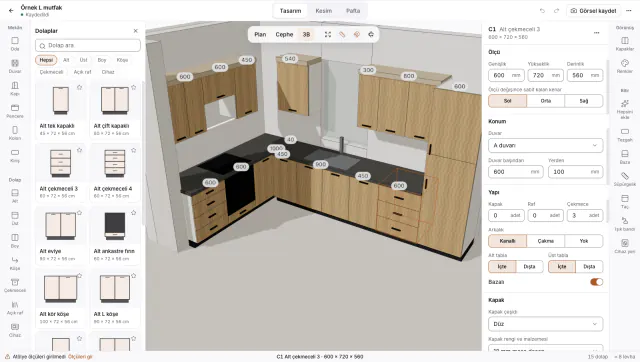
Parametric cabinet settings
Change size, position, drawers and back panel of the selected cabinet in the properties panel.
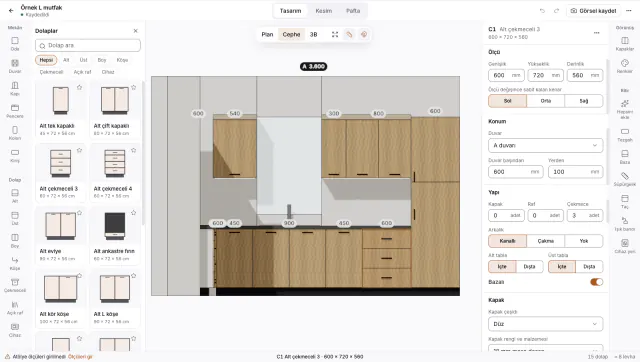
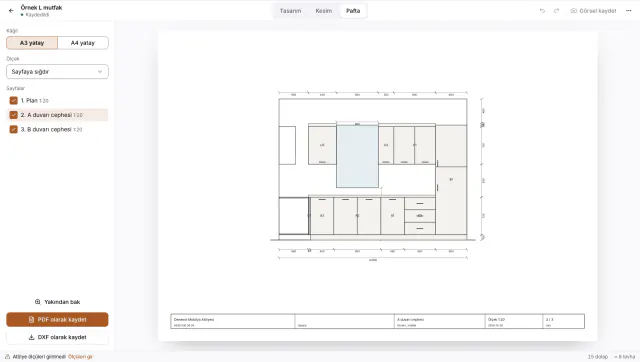
Plan, elevation and 3D views
See the same design as a floor plan, a wall elevation and in 3D.
7 more included items
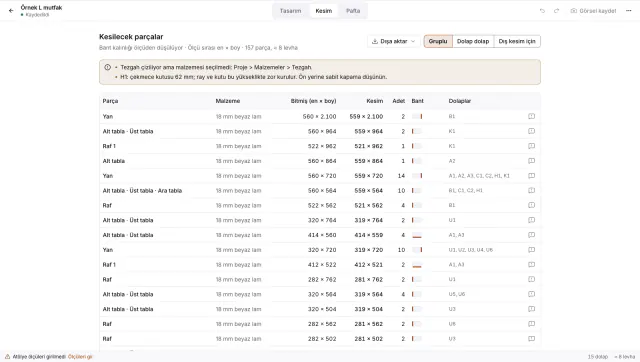
Cutting list and edge banding
The program lists parts from the design: material, finished and cut size, banding and grooves.
Send to cutting
Send parts to the Workshop cutting plan in one click; it shows part layout on each panel.
Per-metre quote
Create the order’s quote version from the design and see when a quote is out of date.
PDF and DXF drawings
Save plans and elevations as scaled drawings in PDF or DXF.
Excel and CSV import
Bring your material and cutting lists in from an Excel or CSV file.
Project file
Save a design as a single file and open it on another computer.
All of the Workshop
Customers, orders, measurements, quotes, production, installation and payments in the same program.
Programs in the library
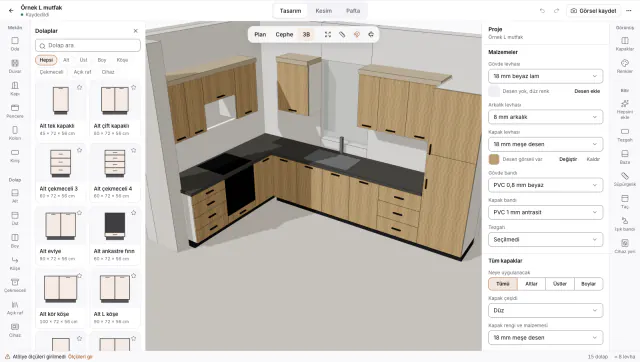
Carbonado Furniture ProBeta
Workshops that design kitchens and cabinets
3D design, parametric cabinets, elevations, cutting lists, per-metre quotes, PDF and DXF drawings.
Carbonado Windows ProBeta
PVC and aluminium joinery workshops
Window drawing and calculation; opens as the Drawing area inside Windows & Glass.
Carbonado Glass ProBeta
Glass cutting workshops
Glass shapes, processing, cut sizes and staged guillotine sheet plans; opens as the Glass Cutting area inside Windows & Glass.
Carbonado Metal Workshop ProBeta
Workshops making railings, doors, window grilles and stairs
Design, pattern library, bar unfolding, sheet parts and DXF; opens as the Design area inside Metal Workshop.
Carbonado Progress Payment ProBeta
Project and site offices preparing progress payments
Quantity takeoff from PDF drawings, Turkish quantity schedule, bill of quantities and monthly progress payments; opens as the Takeoff area inside Project Office.
Carbonado Sign ProBeta
Sign and advertising workshops
Sign design, channel letter and cassette unfolding, LED and transformers, foil cutting and milling output; opens as the Design area inside Print.
Carbonado Embroidery ProBeta
Embroidery workshops
Embroidery patterns, stitch types, automatic satin, simulation, reading and writing DST, PES, JEF and EXP; opens as the Embroidery area inside Print.
In later versions
- CNC output and advanced rendering in Furniture Pro come in later versions.
- Pro programs for other sectors are added based on demand; tell us your sector.
How pro software starts
You apply
First we learn your sector and how you work today.
We install it
Then we install the Furniture Workshop and the Pro design area with you.
We draw the first design together
We draw a kitchen from your own work in the program from start to finish.
You use it free for 6 months
You send us what is missing and we handle it first.
Pro software price
First 6 months free, founding users 50% off the first paid year
The price is per pro program, per year.
Every new user gets the first 6 months free.
Founding users who give feedback in beta get 50% off their first paid year.
Every pro program opens inside its own industry program.
Frequently asked questions
Which sectors have a pro program?
There are seven pro programs, for furniture, windows, glass, metalwork, sign and embroidery workshops and for project offices preparing progress payments. All run on Mac, Windows and Linux. Apply to be a beta user and we will contact you about installation.
Can I import projects from my old design program?
We do not import project files from other programs yet, so you redraw your first designs in Furniture Pro. Import is one of the items we will consider for later versions based on demand.
Do I need a powerful graphics card?
No. Furniture Pro is built to run on the integrated graphics of an ordinary laptop. If no graphics card is available, it switches to a low-quality mode on its own.
Do I need the industry program too?
Yes, it opens inside its industry program: Furniture in Furniture Workshop, Windows and Glass in Windows & Glass, Progress Payment in Project Office, Sign and Embroidery in Print, Metal in Metal Workshop. Design, quotes, cutting and payments sit in one place.
You may also need
- Industry softwareFurniture Workshop and our other industry programs.
- Software showcaseTake a close look at the program screens.
- Pro websiteShow your workshop’s work with a scroll-linked video.
Source: Turkish Personal Data Protection Authority. Your designs and customer details stay on your own computer and do not go to a third-party server.
Apply for pro software
Send the form; we will learn your sector and current method and get back to you.